
MediPencil
Done in minutes.
From conversation to
clinical notes.
MediPencil is designed to reduce the time and effort spent on documentation, without changing how you work, so you can stay focused on patients without giving up control over clinical documentation.
Shortcut Keys
Control functions like starting and stopping
recording with shortcut keys

Automatic Voice-to-Text
Advanced speech recognition automatically transcribes
recorded audio with high accuracy.


MediPencil Helps You
-
Focus on your patient
capture clinical consultations without missing any details
-
Document in detail
create structured medical records within minutes
-
Stay in control
review, edit and copy relevant content into the medical record
Simple, But Accurate
-
Step1
Start recording
Start recording at the beginning of the consultation by clicking record or keyboard shortcut -
Step2
Review summary
After consultation, review and edit the medical note generated by MediPencil -
Step3
Copy and complete
Copy and paste the final medical note to your EMR
Testimonials
Approved by clinicians
-
40%
less time on documentation
-
Under 20s
time it takes to generate a note
-
Clear
time savings observed
*Simulated testing environment, July 2026, Finland.
News

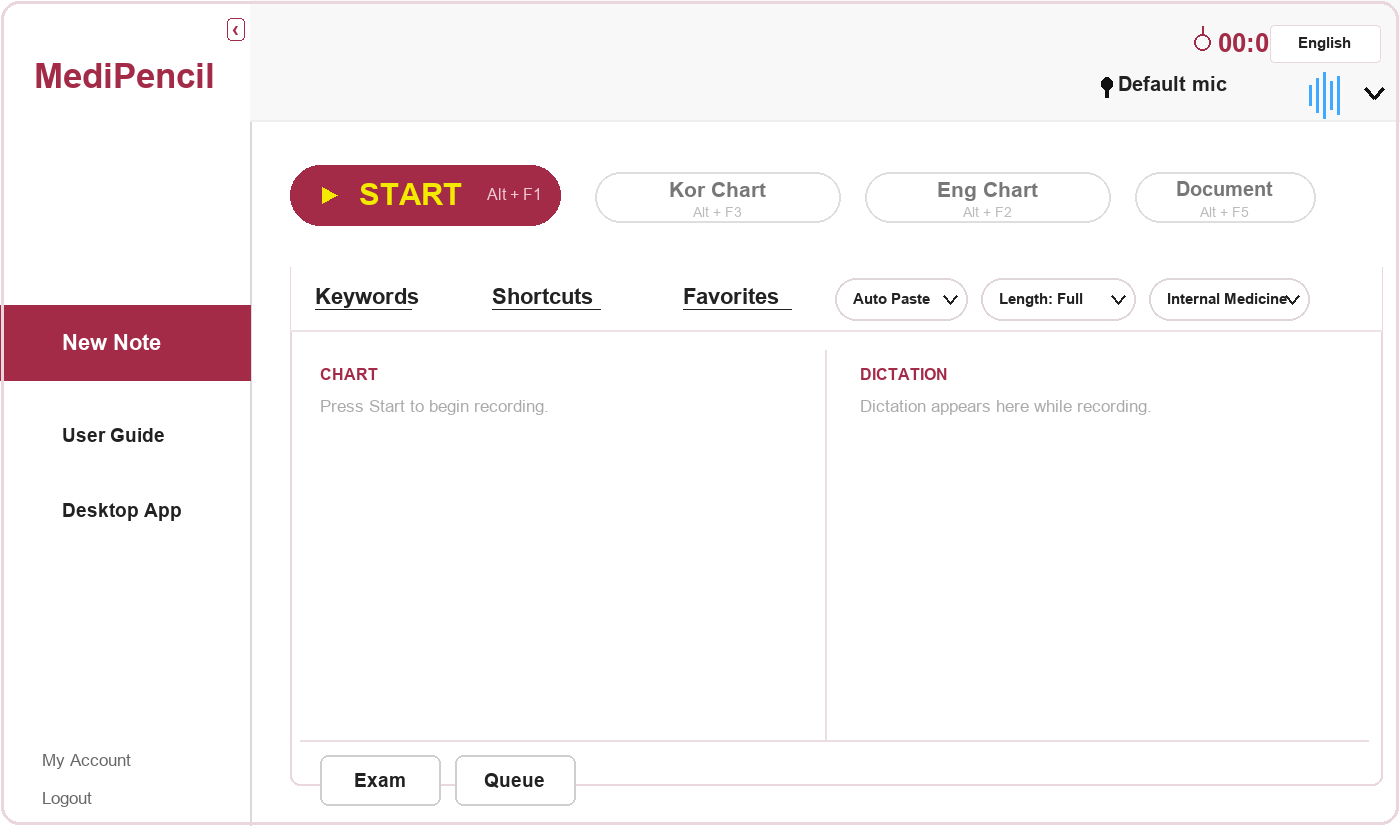
MediPencil listens to your patient conversations and automatically generates structured clinical notes — so you can focus on care, not paperwork.Just press record. MediPencil handles the rest.With MediPencil there's no training needed and no new habits to build. Start a patient visit by pressing the Start button or simply hitting Alt + F1. MediPencil listens to the conversation in real time and generates a structured clinical note when you're done.- Recording starts immediately, with a live microphone level bar so you always know it's active- When you're ready, click Stop recording and press Chart — a progress bar shows the note being generated - When the draft is ready, you make edits if needed and paste the finalized note directly into your EMR with Ctrl + VChoose exactly what goes into your notesMediPencil gives you full control over the structure of every chart. Through the settings menu, you select which SOAP sections appear in the output: - All (SOAP) — full structured note- AP, SP, SOP — partial combinations- S-only, O-only, A-only, P-only — single-section output for specific documentation needsYou decide what matters for each patient visit. MediPencil builds the note to match your preferences.Built for multi-step visits Some visits don't end when the conversation does. When a patient needs a diagnostic test, MediPencil keeps pace with the workflow.- Start recording as usual during the initial consultation- Press Exam — MediPencil generates a partial note and adds the patient to a waiting list- After the test, select the patient from the Waiting List — recording resumes automatically- When you press Chart, the pre-exam notes and post-results conversation are merged into one complete SOAP chartWidget— Always in reach, never in the way The MediPencil widget sits quietly on your screen and doesn't interrupt your workflow.- One click starts or stops recording - Double click generates the chart- Right click opens the full interfaceWidget stays visible when the main window is minimised, and you can drag it to any position on screen. Color signals tell you the state at a glance: mint for standby, red for recording, yellow for analysis in progress.Paste directly into your EMR With one setup step you can paste completed notes directly into a target field in your EMR, without having to always manually copy and paste.- Click the text field in your EMR where notes should appear- Press Ctrl + Shift + F12 to register it- Every chart generated after that is pasted there automaticallySupport consistency across your organization When a team documents in a consistent structure, reviews are faster, handovers are cleaner, and nothing falls through the gaps between clinicians. MediPencil's SOAP output settings and shortcut tools such as quick phrases, keywords, and saved favorites help teams align on how visits are documented, across specialties and clinicians. Ready to use from the first visit MediPencil is designed to fit into how you already work — no new documentation habits to build, no templates to manually configure. Open MediPencil, press Start, and see your next note generate itself.
FAQ
MediPencil currently supports the following specialties: Internal Medicine, Ophthalmology, Pediatrics, Otorhinolaryngology (ENT), Family Medicine/General Practice, Dermatology, Plastic Surgery, Urology, Radiology, Orthopedics, Dentistry, Gynecology, Nursing, and Counseling.
No special equipment is required to get started. MediPencil works with the built-in microphone on your laptop or desktop computer. For optimal accuracy and performance, we recommend using an external microphone if available.
All you need is a computer with a built-in or external microphone. Log in to your account and start using MediPencil through your web browser.
MediPencil currently supports English, Finnish and Korean. We are actively working to add more languages.